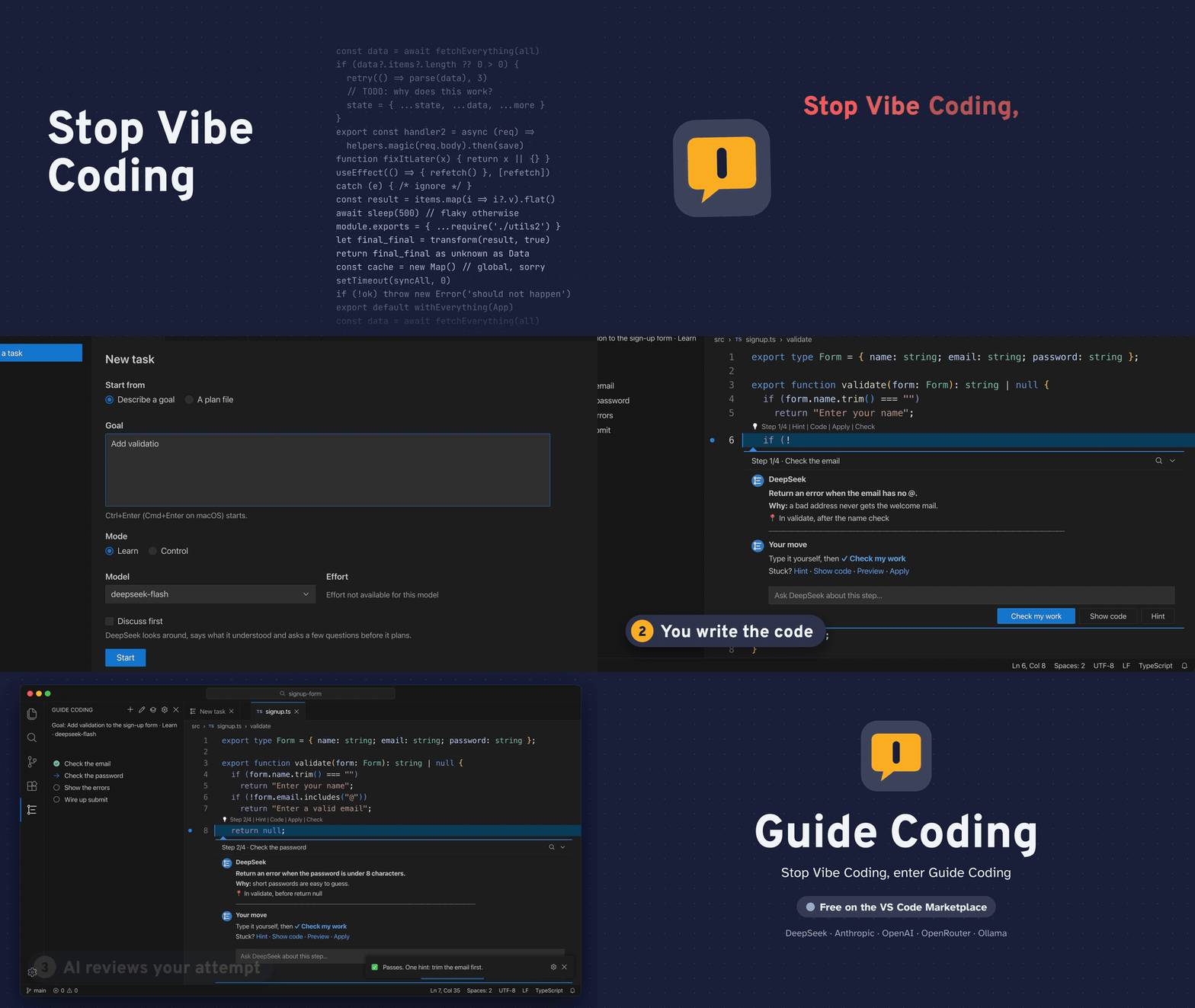
No more vibe coding. Enter Guide Coding.
You write the code. AI guides you, one step at a time.
Guide Coding is a VS Code extension that plans a coding task with the model of your choice and then walks you through it. It does not write the code for you. Each step shows up in the editor, right where the code belongs: what to do, why, and where.
Your API key stays in your operating system's keychain and goes only to the provider you pick; nothing is sent to us. Want to try it without a key? Use a local model through Ollama, and nothing leaves your machine.
Preview. Guide Coding is an early release. It works, but expect rough edges. Please tell us what breaks.
Search for Guide Coding in the Extensions view (publisher novian), or install it from the VS Code Marketplace (Open VSX: coming soon). Then open a folder you trust, and open Guide Coding in the activity bar.
Guide Coding runs on your own model account. On first run, choose Choose provider (or run Guide: Choose model provider), pick one, and paste its API key. The key is checked for free (it only asks for the provider's model list), then stored in your operating system's keychain.
guide.provider |
Your code is sent to | You need |
|---|---|---|
deepseek |
api.deepseek.com | a DeepSeek API key |
anthropic |
api.anthropic.com (Claude models) | an Anthropic Console API key |
openai |
api.openai.com | an OpenAI API key; you pick the model at setup |
openrouter |
openrouter.ai, and the vendor of the model you pick | an OpenRouter key; you pick the model at setup |
ollama |
nowhere: the model runs on your machine (localhost:11434) | no key; you pick one of your installed models |
custom |
the endpoint in guide.baseUrl |
optional: a local server such as LM Studio takes no key |
OLLAMA_CONTEXT_LENGTH (64k, 65536, is a good choice for coding tools). Pick a model that can call tools, for example ollama pull qwen3-coder.guide.maxTaskCostUsd (default 5). For any other model, each turn's tokens are written to the log instead.Any server that speaks the OpenAI Chat Completions API or Anthropic's Messages API works. Add three settings to your user settings (Preferences: Open User Settings (JSON)), then run Guide: Choose model provider and pick Custom endpoint:
guide.baseUrl: the API's base address. For the openai shape it ends just before /chat/completions, usually with /v1; for the anthropic shape it ends just before /v1/messages. It must be HTTPS, or plain HTTP only to localhost or 127.0.0.1: nothing is ever sent over plain HTTP to another machine.guide.apiShape: openai or anthropic.guide.model: the model's id exactly as the endpoint names it. Pick a model that can call tools: the guide works through tool calls.A local model in LM Studio, with no key, so nothing leaves your machine (start LM Studio's server, and copy the model's API identifier from its Developer tab):
"guide.baseUrl": "http://localhost:1234/v1",
"guide.apiShape": "openai",
"guide.model": "qwen/qwen3-coder-30b"
Leave the key box empty when it asks.
A hosted OpenAI-compatible service, Groq for example:
"guide.baseUrl": "https://api.groq.com/openai/v1",
"guide.apiShape": "openai",
"guide.model": "<a model id from Groq's model list>"
Paste the service's key when asked; it is stored in your keychain and sent only to that host. The cost of a custom endpoint is not shown in dollars: each turn's tokens are written to the log instead.
You own the plan: edit, skip, reorder, add and delete steps, and the model adapts. Two more tools for when a step does not fit:
Switch any time from the Guide Coding view's title bar, or with the guide.mode setting.
Guide Coding collects nothing and sends nothing to its author; it has no telemetry. Your goal, the files the model reads, the diff of your changes when you Check, and your messages go only to the model provider you chose, under that provider's terms (with Ollama they stay on your machine). The model can read your workspace but cannot change it: only your Apply and Create file write, and a path guard keeps it out of anything outside the folder and secrets such as .env*, *.pem and .ssh. Your keys live in your keychain, and the task and its conversation in VS Code's workspace storage on your machine. Read the full PRIVACY.md; the terms of use are in the EULA.md.
Found a bug, or have an idea? Open an issue at github.com/OnurGumus/guide-coding/issues. For a bug, please say your VS Code version, provider and model, and what you did. The Guide: Show log output helps, but remove any code and keys from it first.